
The landscape of search has changed forever, and if you haven’t checked your Google Search Console dashboard lately, you might be missing the biggest analytics shift of the decade. Google has officially introduced a dedicated space to track how content surfaces in its AI features. For creators, publishers, and SEOs, this means the guessing game is finally over.
Here is everything you need to know about the new Google Search Console Generative AI Performance Report, built for anyone completely new to the update.
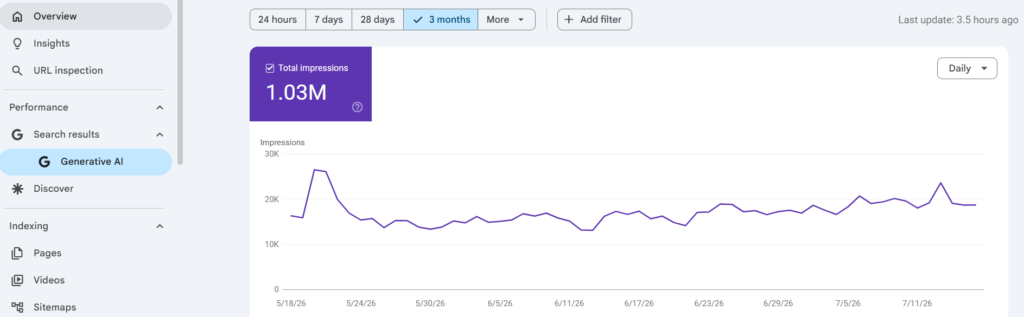
The Separation of SEO and GEO
The Big Shift
For the first time in search history, Google is explicitly separating traditional organic search metrics from Generative Engine Optimization (GEO) metrics. Standard organic search has always relied on the classic “blue links,” but the rise of AI-driven responses demands a completely separate tracking environment.
Why it Matters
Before this report launched, data from AI-generated answers was entirely mixed into your standard organic performance metrics. This made it impossible to know if a spike in impressions came from a traditional search rank or an AI summary block. Site owners were left completely in the dark regarding how their content performed in conversational search interfaces. This new separation changes that entirely.
Core Features: What the Report Tracks
The new report brings much-needed clarity by covering your site’s visibility across three primary AI surfaces: AI Overviews, AI Mode, and the emerging generative features in Discover.
To help you understand exactly what data you are looking at, here is a breakdown of the key metrics provided in the report dashboard:
| Data Dimension | What It Tells the Webmaster |
| Impressions | How many times a link to your site was shown within an AI search element. |
| Pages | The exact canonical URLs Google used to “ground” its AI response. |
| Dates | Performance metrics over time with hourly, daily, weekly, or monthly granularity. |
| Countries & Devices | Geographic origins of the queries and whether users see you on desktop, mobile, or tablet. |
The Critical Gaps: What Google Left Out
While this report is an incredible step forward, it is far from perfect. To make sure you aren’t blindsided when analyzing your dashboard, keep these three critical current limitations in mind:
- No Click or CTR Data: This is strictly an impressions-only report. You can easily track how often your content is cited by the AI, but you cannot see how many users actually clicked through to your site.
- No Query Visibility: Google is keeping user privacy locked down tightly. You cannot see the specific user prompts, keywords, or conversational questions that triggered the AI to pull your site into the response.
- No Search Labs Data: If you are trying to measure early experiment metrics, note that data from historical user opt-in features (like Search Labs) is completely excluded from these totals.
The Hidden Companion: The AI Control Toggle
Most casual guides only talk about the new analytics data, but the most important technical feature rolled out alongside the report: the Search Generative AI Control.
Found directly under your main GSC settings menu, this tool gives webmasters a literal on/off switch. It allows you to explicitly choose whether your website can be used to ground Google’s generative AI responses.
Strategic Advice: While it might be tempting to block AI scrapers out of fear, opting out of AI features is essentially opting out of future Search visibility. Instead of panic-blocking your content, use the data in the report to optimize your pages and capture this new wave of traffic.
Access Traps: “Why Can’t I See It?”
If you just opened your Google Search Console account and don’t see the “Generative AI” tab, don’t panic. There are two very specific technical reasons why the report might be missing for you right now:
- Staged Rollout: Google is testing the infrastructure with a limited subset of site owners first before completing a wider global rollout.
- Impression Threshold: Just like rich snippet reports, if your website does not currently receive enough baseline impressions or citations from AI Overviews or AI Mode, the tab will not appear in your sidebar at all.
Action Plan Summary
Succeeding in the age of conversational search requires transitioning away from old SEO habits like keyword repetition and focusing instead on structural authority. To start winning more impressions in this new report, implement these three optimizations immediately:
- Enforce a clean, sequential semantic HTML hierarchy so AI models can easily parse your layout.
- Write clear, direct 45-word question-and-answer summaries right below your main headings so Google can easily lift them into snippet blocks.
- Deploy advanced JSON-LD schema markup to give the AI engine explicit, verified entity data mapping.
For a much deeper dive into how Google’s systems extract, process, and display web data to populate these brand-new dashboards, you can read the official announcement directly on the Google Search Central Blog.
Frequently Asked Questions (FAQs)
Q1: Will my visibility in AI Overviews and AI Mode be hurt if I don’t use the Search Generative AI Control toggle?
A: No, your visibility will not be hurt. The new toggle is an opt-out mechanism, meaning your site is included by default to ground Google’s generative AI features. Leaving the toggle untouched simply allows Google to continue citing your content, giving you the opportunity to earn impressions inside the new report.
Q2: Why does my standard organic Search Performance report show higher clicks than my Generative AI report?
A: Currently, the Generative AI Performance Report is an impressions-only dashboard. Google has completely excluded click and Click-Through Rate (CTR) data from this specific report for the time being. Your traditional search report will continue to reflect direct clicks from standard organic listings.
Q3: Can I see the exact conversational prompts users typed to find my pages in AI Mode?
A: No. Google has built a strict query visibility barrier into this version of the report to protect user privacy. While you can see the exact canonical URLs the AI used to ground its answers, you cannot see the underlying keywords or user prompts.
Q4: I am optimizing my site template’s code structure, but the Generative AI tab still hasn’t appeared. What should I do?
A: First, verify that you aren’t suffering from an impression threshold issue. The tab will remain completely hidden until your site hits a minimum baseline of generative impressions. Focus on building structural authority—such as proper semantic HTML hierarchies and clean JSON-LD schema layouts—to give the AI engine the data clarity it requires to begin citing your URLs.