
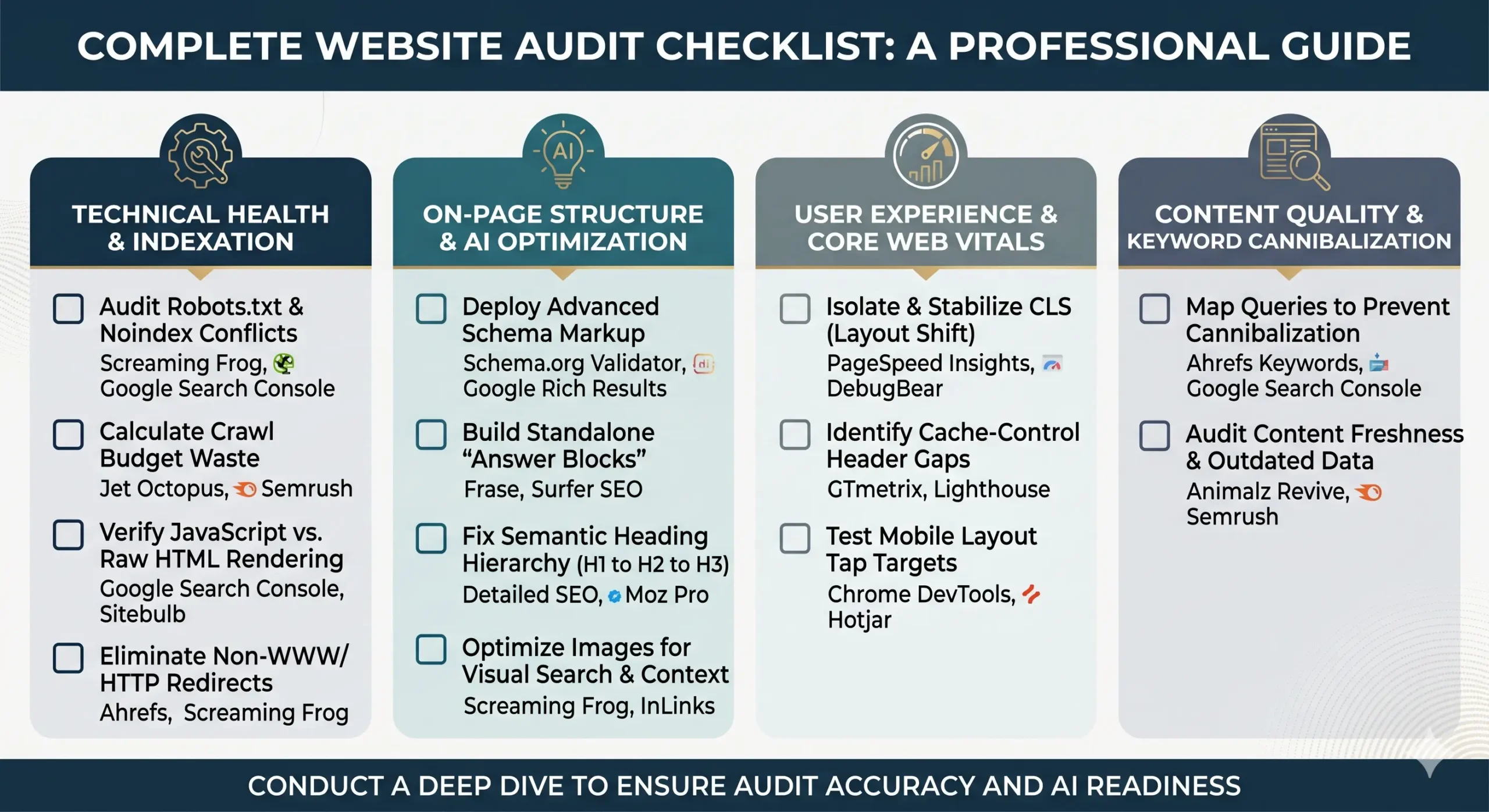
A website audit is the digital equivalent of a full-body medical checkup. Most guides cover the basics: fix your broken links, write better meta tags, and upload a sitemap. But in today’s search landscape—where Google’s AI Overviews prioritize structured authority and precise backend data—the obvious fixes aren’t enough.
To ensure a site survives core updates and feeds AI search engines exactly what they want, a deep dive is required. This step-by-step checklist focuses on the critical, overlooked details that traditional audits leave behind, paired with the exact tools needed to find them.
1. Technical Health & Indexation Checklist
Before optimizing content, the foundational infrastructure must be flawless. If search bots get trapped in the backend, brilliant copy won’t matter.
- [ ] Audit the Robots.txt File for Noindex Conflicts: A common pitfall is using
robots.txtto block low-value pages. If a page is blocked viarobots.txt, Google cannot see anoindextag placed on the page itself. To properly de-index a page, remove the robots.txt block and let bots read the cleannoindextag. Learn more about Google’s Robots.txt Specifications.- 🔧 Recommended Tools: Screaming Frog SEO Spider (to run a simulated crawl under custom robots.txt settings) or Google Search Console (via the Live URL Test feature).
- [ ] Calculate the True Crawl Budget Waste: Do not just look at the total pages indexed. Divide the total site pages by the daily crawl stats. A ratio greater than 3 indicates that search bots are burning resources on useless pages, dynamic filters, or tracking parameters.
- 🔧 Recommended Tools: Jet Octopus or Semrush Site Audit (specifically checking the “Crawlability” reporting section).
- [ ] Verify Rendered JavaScript vs. Raw HTML: Modern websites rely heavily on JavaScript frameworks. Compare the “Raw HTML” with the “Rendered HTML”. If critical internal navigation links or content blocks only appear after JavaScript executes, search engines may miss them entirely during initial passes.
- 🔧 Recommended Tools: Google Search Console (URL Inspection Tool) or Sitebulb (which offers a visual side-by-side comparison of raw vs. rendered code blocks).
- [ ] Eliminate Non-WWW or HTTP Capitalization Traps: Ensure that variations like
http://example.com,https://example.com, andhttps://www.example.com/Page/(with capital letters) all cleanly redirect via a 301 status code to a single, canonical lowercase HTTPS version. Unlinked, loose variations create duplicate tracking data.- 🔧 Recommended Tools: Ahrefs Site Audit or Screaming Frog (filtering by the Redirection 3xx tab).
2. On-Page Structure & AI Overview Optimization Checklist
Google’s AI Overviews actively scan web pages for concise, structured, and authoritative data points to use as cited sources.
- [ ] Deploy Advanced Schema Markup Frameworks: Standard Organization schema is no longer enough. Implement comprehensive Article, FAQ, and HowTo schema across all relevant directories. This explicit data helps semantic search models confidently connect a business entity to specific industry solutions. Review the official Schema.org Documentation to build valid code blocks.
- 🔧 Recommended Tools: Schema.org Validator or Google Rich Results Test.
- [ ] Build Standalone “Answer Blocks” for Informational Queries: For top-of-funnel guide pages, insert a clear 40 to 60-word summary directly beneath the primary H1 or H2 heading. Avoid complex filler text so an AI engine can easily extract it as a quick answer snippet.
- 🔧 Recommended Tools: Frase or Surfer SEO (using their structural analysis features to match paragraph lengths with top-ranking answer targets).
- [ ] Fix Semantic Heading Hierarchy Violations: Skipping from an
<h1>directly to an<h3>, or using<h2>tags for stylistic choices like sidebar buttons, breaks the structural outline of the document. Keep the HTML perfectly nested so machine readers can map the contextual relationships of the arguments.- 🔧 Recommended Tools: Detailed SEO Extension (for a quick visual view of headings) or Moz Pro Site Crawl.
- [ ] Optimize Images for Visual Search and Screen Context: Beyond standard alt text keywords, ensure image file names are descriptive (e.g.,
complete-website-audit-checklist.jpginstead ofIMG_0402.jpg). The alt text should explicitly state what is visible in the graphic to assist both visually impaired users and machine-learning vision models.- 🔧 Recommended Tools: Screaming Frog (Images tab filtered by missing or weak alt text) or InLinks (to analyze entity relationships in image contexts).
3. User Experience & Core Web Vitals Checklist
Performance metrics directly dictate how long real visitors stay on a page, which heavily influences broader organic performance metrics.
- [ ] Isolate and Stabilize Cumulative Layout Shift (CLS): Visual stability matters. Check that all imagery, ad blocks, and embedded media elements have explicit width and height attributes declared in the CSS. This prevents page elements from jumping around while loading, protecting users from accidental clicks. Take a look at the Web.dev Core Web Vitals Guide for deep optimization workflows.
- 🔧 Recommended Tools: Google PageSpeed Insights or DebugBear (excellent for visual timeline breakdowns of a layout shifting).
- [ ] Identify Cache-Control Header Gaps: Check the server configurations to guarantee that static assets like logos, CSS files, and core scripts have aggressive long-term cache headers enabled. Forcing returning users to download identical assets on every single page load slows down journey speeds.
- 🔧 Recommended Tools: GTmetrix or Lighthouse (built right into Google Chrome Developer Tools under the Audits panel).
- [ ] Test Real-World Mobile Layout Tap Targets: A page passing the basic mobile-friendly test does not guarantee a great user experience. Manually verify that links, menu bars, and interactive call-to-action buttons have at least 48×48 pixels of spacing around them to avoid frustrating mobile users.
- 🔧 Recommended Tools: Google Chrome DevTools (using mobile device simulation mode) or Hotjar (using real-user session recordings to spot where visitors are mis-clicking).
4. Content Quality & Keyword Cannibalization Checklist
An effective audit ruthlessly targets duplicate intent and obsolete content assets.
- [ ] Map Queries to Prevent Keyword Cannibalization: When multiple URLs rank for the exact same target keyword phrase, they fight each other in search results. Combine these thin, overlapping pages into a single, comprehensive guide, then use a 301 redirect from the old URLs to the new master page.
- 🔧 Recommended Tools: Ahrefs Keywords Explorer (Organic Keywords report sorted by historical URL shifts) or Google Search Console (exporting keyword data to check for multiple landing pages ranking for the same term).
- [ ] Audit Content for Freshness and Outdated Data: Review top-performing assets to ensure all statistics, tool references, and outbound links are up to date. Outdated references destroy user trust and lower the citation priority for modern search algorithms.
- 🔧 Recommended Tools: Animalz Revive (a free tool that finds content losing search traffic) or Semrush Content Audit.
Website Audit Summary Reference Table
| Audit Pillar | Core Focus Area | Primary Metric to Monitor | Recommended Essential Tool |
| Technical Health | Crawl efficiency and rendering accuracy | Log file data, Indexation status | Screaming Frog & Search Console |
| AI Optimization | Structured data and answer block formatting | Schema validity, Citation visibility | Rich Results Test & Surfer SEO |
| User Experience | Layout stability and fast asset delivery | CLS, Interaction to Next Paint (INP) | PageSpeed Insights & DebugBear |
| Content Strategy | Intent mapping and pruning thin pages | Organic impressions, Click-through rates | Ahrefs & Google Search Console |
A Final Note on Audits: A true website audit is not a static task to complete once and forget. It is an ongoing optimization loop. By cleaning up technical debt, fixing hidden structural gaps, and presenting clear data structures with the right toolkits, you build a digital asset designed to perform beautifully for both human visitors and automated search engines alike.