
You spend hours crafting the perfect email broadcast. You write a catchy subject line, design a clean template, and insert a bold button that says “Shop Now.”
You hit send, and the initial numbers look great: people are opening your email, and a healthy percentage of them are clicking that button.
Then you check your sales or conversion dashboard… and almost nothing happened.
Where did all those interested people go? Why did a click on a link fail to turn into a purchase, a booking, or a form submission?
If you’re facing this problem, you aren’t alone. The issue usually isn’t your offer or your audience—it’s the friction built into traditional email marketing.
Here is a beginner-friendly breakdown of why email click-throughs fail to convert, and how Interactive AMP Emails are solving this problem by turning static messages into functional in-box experiences.
1. The Hidden Problem: The “Click-and-Wait” Friction Gap
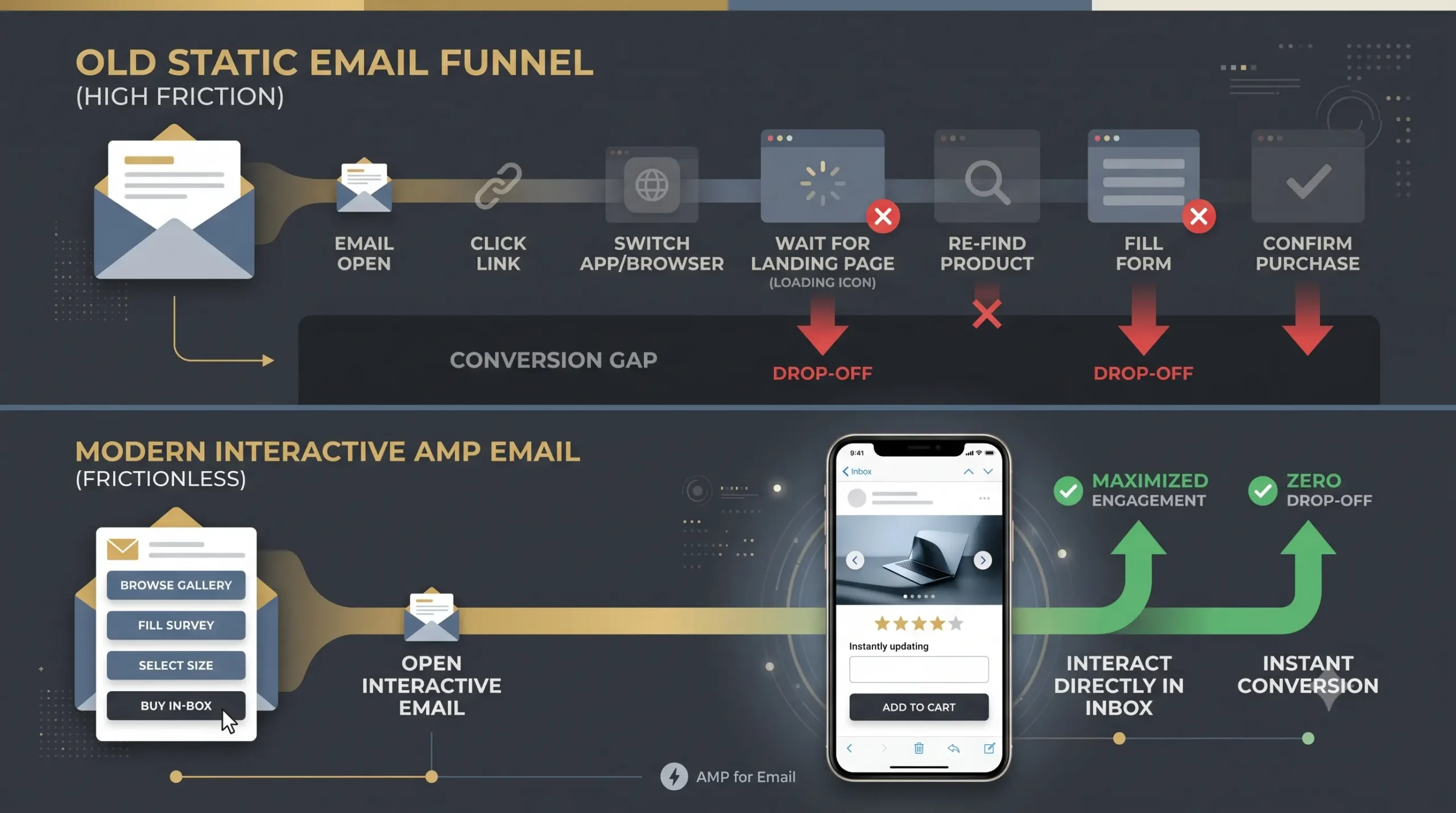
To understand why traditional emails fail to convert, let’s look at the journey a subscriber has to take after clicking a link in a standard email:
- The Click: The user taps a link or button in their email inbox.
- The App Switch: Their phone or computer freezes for a second while switching from the email app to a web browser (like Chrome or Safari).
- The Loading Screen: The browser opens, and the user waits 3 to 5 seconds for your landing page, images, and tracking scripts to load.
- The Navigation: The user has to relocate the specific item, form, or button they were looking at in the email.
- The Form/Checkout: They manually type in their information across multiple fields or steps.
Every Extra Step Costs You Money
Think of every step in that chain as a leak in a bucket.
If your landing page takes just three seconds to load, over 50% of mobile users will hit the back button and abandon the page entirely. If they get a notification from a friend while the browser is loading, they’re gone. If your landing page looks slightly different from the email they just read, they get confused and leave.
This gap between clicking an email and completing an action on a website is where the vast majority of your potential conversions disappear.
2. What Are Interactive AMP Emails?
AMP for Email (Accelerated Mobile Pages) is an open-source framework created by Google that allows email marketers to embed interactive, dynamic, and web-like elements directly inside an email.
Instead of functioning like a static paper flyer with a link pointing somewhere else, an AMP email functions like a mini-website or a micro-app inside the user’s inbox.
With interactive AMP emails, subscribers can:
- Browse product galleries and tap through image carousels.
- Expand and collapse FAQ sections or product specifications.
- Submit feedback, fill out survey forms, or RSVP for events.
- Select product options (like sizes, colors, or quantities) and add items directly to a shopping cart.
All without ever opening a new browser tab or leaving their inbox.
3. How AMP Emails Fix Your Conversion Drop-Off
By eliminating the need to redirect users to an external website, AMP emails systematically remove the biggest conversion barriers.
A. Zero Page Load Waiting Time
Because the interactive components are rendered directly inside the email client (like Gmail or Yahoo Mail), there is zero delay. When a user taps an accordion menu or selects a survey answer, the response is instant. No loading spinners, no app switches.
B. Instant Impulse Action
When a subscriber sees a product they like, their intent to act is at its peak. Traditional emails force them to hold onto that intent through redirects and page loads. AMP emails let them complete the action immediately while their enthusiasm is fresh.
C. Real-Time Dynamic Data
Have you ever clicked a promo email, landed on the website, and realized the product was out of stock or the sale ended? It’s frustrating.
AMP emails can pull real-time data from your server the moment the email is opened. If a product goes out of stock, the email updates automatically to show a back-in-stock notification form instead of an outdated product link.
4. 4 Real-World Examples of AMP Emails in Action
To visualize how this works in real life, here are four practical ways brands are using interactive emails today:
1. In-Email Surveys and Reviews
- Old Way: Email says “Rate your recent purchase,” user clicks button, browser opens, user fills out a 5-star rating on a web page.
- AMP Way: The 5-star rating scale and text box sit right inside the email. The user taps 5 stars, types “Great product!”, hits submit, and gets a “Thank You” confirmation message inside the inbox in under 3 seconds.
2. Interactive Product Carousels & Accordions
- Old Way: An email lists ten different products in a long, overwhelming vertical scroll that clutter the inbox.
- AMP Way: A sleek image carousel lets users swipe left and right to view different color variants or product angles, while collapsible accordion menus keep long text clean and easy to scan.
3. Event Booking & Scheduling
- Old Way: Email asks user to book a consultation, links to a Calendly page, user picks a date on the web browser.
- AMP Way: An interactive calendar is embedded in the email. The recipient selects an available time slot, enters their name, and confirms the booking directly in their inbox.
4. Interactive Quizzes & Recommendation Engines
- Old Way: Email links to a “Find Your Skincare Routine” quiz on a website.
- AMP Way: Subscribers answer three quick diagnostic questions directly inside the email body, and the email instantly displays custom product recommendations based on their answers.
5. How to Get Started with Interactive Email Marketing
If you’re new to AMP for email, you don’t need to completely overhaul your existing email setup to test it out.
- Start Small: Don’t try to build a full e-commerce store inside an email on day one. Start with simple interactive elements like star-rating feedback forms, poll questions, or collapsible FAQ accordions.
- Ensure Fallback Support: While major email clients (like Gmail, Yahoo, and FairEmail) support AMP, some clients (like Apple Mail) display static HTML fallback versions. Modern Email Service Providers (ESPs) make it easy to include a standard HTML version alongside your AMP version so everyone gets a great experience.
- Keep the Interface Simple: Just because you can put interactive widgets in an email doesn’t mean you should overload it. Keep the focus on a single primary action you want the subscriber to take.
The Bottom Line
A click on an email button isn’t a guarantee of a sale—it’s just a sign of interest.
If your current email marketing strategy relies on forcing interested subscribers through multi-step redirects, slow landing pages, and long external forms, you will continue losing potential customers along the way.
By bringing the action directly to where your customers’ attention already lives—their inbox—interactive AMP emails eliminate friction, shorten the buyer’s journey, and turn fleeting interest into real conversions.
Frequently Asked Questions
1. Why do email subscribers click my links but fail to convert on my website?
Most drop-offs happen during the transition between the email and your website. Slow page loads, app-switching delays, and distracting landing page layouts cause impatient mobile users to abandon the process before taking action.
2. What is an interactive AMP email?
AMP for Email is a technology that allows you to embed interactive, web-like features—such as forms, product carousels, accordion menus, and checkout options—directly inside the email body so users can act without leaving their inbox.
3. Do AMP emails work on every email client?
While major providers like Gmail and Yahoo Mail fully support AMP emails, some clients (like Apple Mail) do not. However, modern email platforms automatically serve a traditional static HTML version to those users, ensuring everyone can read your message.
4. Will using AMP emails slow down my email delivery?
No. AMP emails are optimized for fast rendering inside supported inbox providers. In fact, because users don’t have to load external web pages to complete actions, the overall user experience is much faster than traditional links.
5. What is the easiest interactive feature to try first?
Single-tap feedback forms, star-rating surveys, or collapsible FAQ accordions are the easiest AMP features to set up. They provide immediate interactivity without requiring complex backend integrations.